Video is the most demanding medium to anonymize. A single clip combines moving faces, license plates and screens that drift in and out of frame, plus an audio track full of spoken names and numbers. Miss a face for three frames and you have leaked a person's identity; over-blur and the footage becomes useless for review, training or evidence.
This guide explains how to anonymize video properly: how to blur faces so they stay covered stably across every frame, why per-frame detection combined with tracking beats a naive blur, how to handle the audio track, and how to make the whole result irreversible, auditable and compliant.
TL;DR
- Anonymizing video means destroying identifying pixels (faces, plates, screens) and removing spoken PII from the audio, not hiding them behind a removable layer.
- A stable blur requires per-frame detection plus geometric tracking, so the blur stays locked on a face even when the detector misses a frame.
- The audio track needs the same treatment as a standalone recording: locate spoken PII, then beep or silence it.
- Done correctly the result is irreversible: the original pixels and samples are re-encoded away, not masked.
- You can anonymize a video file right now without an account: upload, choose what to blur and beep, and download the result.
At a glance, anonymizing a video takes four steps:
1.Upload
Drop in your video. No account, no install.
2.Detect & track
AI locates every face, plate and screen, then tracking locks each box across frames.
3.Review
Check the detections, fine-tune regions and mark spoken PII to beep.
4.Export
Deterministic code burns in the blur and beeps, then re-encodes an irreversible copy.
What "anonymizing video" actually means
Anonymization is not slapping a black bar over a face in a thumbnail. For video, anonymization means finding every identifying element in every frame and in the audio, then destroying it in the file itself so it cannot be recovered.
Two distinct jobs hide inside that sentence:
- Locating the sensitive content: knowing where a face, plate or screen sits in each frame, and when a name or number is spoken.
- Removing it: re-encoding those exact pixel regions into a blur, and replacing those exact audio ranges with a beep or silence.
Confusing the two is the most common mistake. Locating benefits enormously from AI (face detection, object detection, speech-to-text). Removing should never be left to a generative model; it must be deterministic code operating on precise coordinates and timestamps, because that is what makes the result reproducible, testable and trustworthy.
Why a naive blur fails
The intuitive approach is: run a face detector on each frame, blur whatever it finds, move on. It looks fine for a still image and falls apart on motion.
Detectors are probabilistic. On any given frame a face can be missed because the subject turned their head, walked behind a pillar, was caught mid-motion-blur, or simply fell below the model's confidence threshold for that one frame. The result is the failure everyone has seen: a blur that flickers, covering a face for twenty frames, vanishing for three, then snapping back. Those three exposed frames are a full identity leak, and at 30 frames per second they are invisible to a casual reviewer but trivial to extract.
Three frames is a full leak
At 30 frames per second, a face exposed for just three frames is invisible to a casual reviewer but trivial to extract with a frame-by-frame scrub. A blur that flickers is not a blur; it is an identity leak waiting to be found.
Per-frame detection answers "is there a face here, now?" It does not answer "this is the same face that was here a moment ago, so keep covering it." That second question is what tracking solves.
Per-frame detection plus geometric tracking
The reliable approach pairs two techniques:
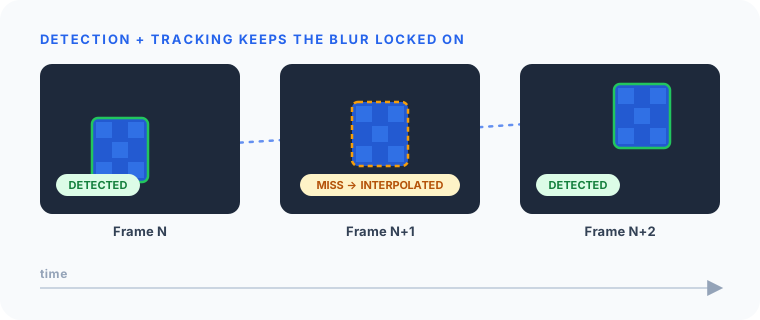
Detection finds faces
A detector runs on frames and returns bounding boxes for every face it is confident about. This is the AI "locating" step, and it is allowed to be imperfect, because tracking absorbs its gaps.
Tracking keeps the blur locked on
Tracking associates a detection in one frame with the same subject in the next, building a trajectory for each face. Geometric tracking models how a bounding box moves (position and velocity) so that when the detector misses a frame, the tracker interpolates where the face should be and keeps the blur in place. Common building blocks include:
- IoU / overlap association: match a box in frame N+1 to the box it most overlaps in frame N.
- Kalman-style motion prediction: estimate the next position from recent velocity, covering short detection gaps.
- Trajectory smoothing: average box positions over a small window so the blur glides instead of jittering.
The payoff: the blur follows the face through head turns, brief occlusions and motion blur, with no flickering exposed frames.
| Approach | Stability | Leak risk | Best for |
|---|---|---|---|
| Naive per-frame blur | Flickers; gaps on missed detections | High (exposed frames) | Quick demos only |
| Detection + geometric tracking | Smooth, locked-on blur | Low | Production anonymization |
| Manual frame-by-frame masking | Perfect if done exhaustively | Low, but human error | Short, high-stakes clips |
For any footage longer than a few seconds, detection plus tracking is the only approach that scales without leaking.
Choosing the obfuscation: blur vs. pixelation
Once a region is located and tracked, you destroy it. Two deterministic operations dominate:
- Gaussian blur: smooths the region into an unrecognizable smear. Visually soft, hard to reverse when the kernel is strong enough.
- Pixelation (mosaic): averages the region into large blocks. Visually obvious that redaction happened, which is useful as a visible audit signal.
Both are irreversible when applied at sufficient strength and re-encoded into the pixels. A weak blur over a high-resolution face can sometimes be partially recovered, so strength matters: the goal is to destroy the high-frequency detail that makes a face identifiable.
Don't forget the audio track
A video is two synchronized media. Blurring faces while leaving the audio untouched is an incomplete anonymization. A clip where someone says "this is John Smith, account 4012 3456 7890 1234" leaks identity even with every face covered.
Handle the audio exactly as you would a standalone recording:
- Locate spoken PII with a timestamped transcript: speech-to-text with word-level timestamps, then named-entity recognition for names, plus regex-with-checksum for structured identifiers like card numbers and IBANs.
- Remove it deterministically on the waveform: replace each sensitive time range with a beep (audible, leaves an audit signal) or silence (less intrusive).
The same separation of concerns applies: the model locates, deterministic code removes. For the full treatment of the audio side, see how to anonymize audio recordings and, for telephony specifically, redacting PII from call recordings.
Why AI should locate but not remove
It is tempting to hand the whole video to a model and ask it to "return the anonymized version." Don't. Generative editing is non-deterministic: run it twice and you may get two different outputs, with no guarantee that every face in every frame and every spoken identifier was removed.
The clean pattern separates concerns across the whole pipeline:
- AI locates: face/object detection per frame, transcription plus entity detection in audio. Tasks models are genuinely good at.
- Deterministic code removes: coordinates → blur, timestamps → beep/silence. Tasks that must be exact, testable and repeatable.
This is exactly how Medianonymizer approaches every media type: the model only points at sensitive data; plain code does the destruction, the same way every time, with a record of what was changed.
Is anonymized video truly irreversible?
Yes, if you re-encode the redacted pixels and audio samples rather than overlaying a removable mask. A genuine blur or pixelation destroys the high-frequency detail in those regions; a beep or silence destroys the original samples in those ranges. There is no hidden layer, no key, no separate track to peel back.
This is the difference between anonymization and pseudonymization. Pseudonymization swaps identifiers for reversible tokens that can be restored with a key. Anonymization removes the data for good, which is what takes footage out of scope of regulations like the GDPR. If you need the distinction in detail, see anonymization vs. pseudonymization.
Two cautions that quietly break irreversibility:
- Overlay masks: a black box or blur drawn as a separate layer in some formats can be removed. Only baked-in re-encoding counts.
- Metadata: video containers carry GPS coordinates, device identifiers and timestamps. Strip them, or you anonymize the picture and leak the location.
Anonymize the whole file, not just the picture
A perfectly blurred clip still leaks identity through spoken names in the audio track and GPS coordinates in the container metadata. Treat all three (pixels, audio and metadata) as one job.
Common use cases
- CCTV and surveillance footage: blur bystanders before sharing clips for investigations or insurance. (See anonymizing CCTV and surveillance footage.)
- Dashcam and bodycam: cover faces and plates before disclosure or publication.
- Training and research video: protect participant identity while keeping behavior analyzable.
- Media and marketing: clear footage of incidental bystanders for publication.
- Meeting and webinar recordings: cover participant faces in Zoom, Teams and Meet recordings before sharing them beyond the people who were in the call.
- Compliance archives: retain video with personal data removed to satisfy minimization rules.
A practical checklist
Before you consider a video anonymized, confirm:
- Every face (and plate/screen) is blurred in every frame, including head turns and occlusions.
- The blur is driven by detection plus tracking, with no flickering exposed frames.
- Obfuscation is strong enough to destroy detail, verified by re-encoding, not an overlay.
- The audio track has spoken PII beeped or silenced.
- Container metadata (GPS, device IDs, timestamps) is stripped.
- The result was reviewed: automated detection plus a human spot-check, ideally scrubbing frame by frame in the hardest moments.
Anonymize your video now
You don't need to build this pipeline yourself. Our automatic tool to blur faces in video runs the entire detection-plus-tracking pipeline in a single pass. Upload a video, tell the assistant what to blur and what to beep, and download an anonymized copy where every face is tracked and covered across every frame and every sensitive moment in the audio is removed, irreversibly.
Frequently asked questions
Frame-by-frame detection alone misses faces whenever someone turns, is partially occluded, or motion-blurs. The fix is to combine per-frame detection with geometric tracking that interpolates a face's position across frames, so the blur stays locked on even when the detector momentarily loses it.